Migrate OST Files to
Office 365 Directly

Seamlessly upload offline OST files to Microsoft 365 (Office 365) user and admin accounts using Modern Authentication. No Outlook required.

✓ Modern Auth Supported ✓ 100% Safe & Secure ✓ 24/7 Support
OST to Office 365 Tool Box

TRUSTED BY IT ADMINS AT

MICROSOFT IBM CISCO DELL HP

Watch It In Action

See how easily you can migrate OST files to Office 365.

Advanced Migration Features

Specialized tools to ensure smooth OST to Office 365 migration projects.

Modern Authentication

Supports modern OAuth 2.0 authentication for secure login to Office 365 accounts without compromising credentials.

Bulk Migration

Import multiple OST files to different Office 365 accounts simultaneously using CSV mapping (Admin Mode).

Primary & Archive Mailbox

Option to migrate OST data to either the Primary Mailbox or the In-Place Archive Mailbox of the Office 365 user.

Zero Data Loss

Preserves all email attributes (Read/Unread status), inline images, attachments, and folder hierarchy during upload.

Selective Migration

Filter data by Date Range, Subject, or specific Folders to migrate only the necessary emails to the cloud.

Recover & Migrate

Auto-scans and repairs corrupted or orphaned OST files before migrating them to the Office 365 destination.

Admin Impersonation

Admins can migrate OST files to multiple user accounts within the tenant without needing individual user passwords.

Compatible with All OSTs

Supports OST files from Outlook 2021, 2019, 2016, 2013, 2010, and Exchange/IMAP environments.

Technical Specifications

System requirements and supported versions.

Version
1.7.0
Windows OS
Windows 11, 10, 8.1, 8, 7 (32 & 64 Bit) & Windows Server 2022, 2019, 2016
System Requirements
Processor: Intel® Pentium Class; Memory: 2 GB RAM (4 GB recommended); Disk Space: 100 MB
Source
Offline Outlook Data Files (.ost) - Encrypted, Corrupted, or Healthy
Destination
Office 365 (Microsoft 365) User & Admin Accounts

How It Works

Migrate OST to Office 365 in 3 simple steps.

1

Add OST File

Launch the tool and add your OST file(s) for scanning.

2

Select Office 365

Choose "Office 365" from the export options.

3

Login & Migrate

Enter credentials (secure login) and start the migration.

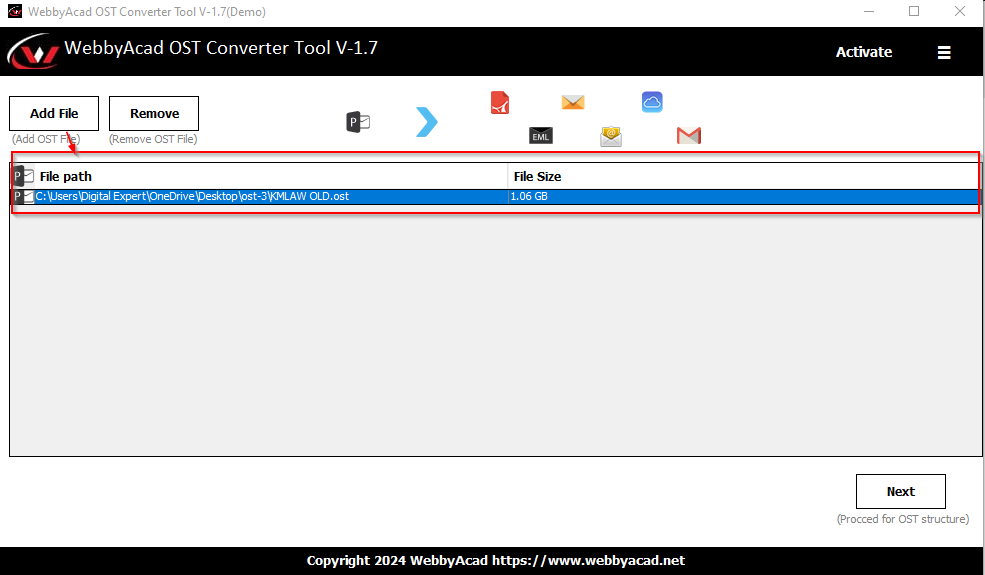
Add OST File

Launch the tool and add your OST file(s) for scanning.

Step Screenshot

Comparison: Licensed Versions

Features Personal Business Corporate Enterprise
License Validity Lifetime Lifetime Lifetime Lifetime
System Installation 1 PC 2-50 PCs Multiple PCs Unlimited
Bulk OST Migration -
Admin Impersonation - -
Support Priority Standard Priority Dedicated VIP
100%
MONEY BACK GUARANTEE

30-day money-back promise.

Why Choose Webbyacad?

The preferred choice for businesses moving from on-premise Exchange to the Cloud.

Migration Excellence

🚀

Fast Upload Speed

Optimized engine ensures rapid data transfer to Office 365 servers.

🛡️

Secure Login

Uses Microsoft's official OAuth mechanism. We never store your passwords.

📁

Hierarchy Intact

Your mailbox structure in Office 365 will look exactly like your local OST.

📋

Detailed Logs

Generates a complete report of the migration process for audit purposes.

Supported Ecosystem

📂

Source

Exchange OST, IMAP OST, Hotmail OST, Outlook.com OST

☁️

Destination

Office 365 Business, Enterprise, and Education Plans

📎

Items

Emails, Contacts, Calendars, Tasks, Notes, Journals

💻

Compatibility

Supports Windows 11, 10, 8, 7 and Windows Server versions

We operate in strictly Read-Only mode on your source OST file.

Flexible Pricing Plans

Choose the license that suits your needs. 100% Secure Payment.

Personal

For Single User

$39
  • ✓ 1 System License
  • ✓ Migrate OST to Office 365
  • ✓ Restore Deleted Items
  • ✓ Standard Support
Buy Now

Business

For Small Teams

$99
  • ✓ 2-50 System Licenses
  • ✓ Bulk Migration
  • ✓ CSV Mapping
  • ✓ Priority Support
Buy Now

Corporate

For Organizations

$199
  • ✓ Multiple Corporate Machines
  • ✓ Admin Impersonation
  • ✓ Unlimited Migration
  • ✓ Dedicated Account Manager
Buy Now

Enterprise

For Multiple Sites

$249
  • ✓ Multiple Sites & Unlimited
  • ✓ 2 Years Free Upgrade
  • ✓ VIP Priority Support
  • ✓ Remote Migration Help
Buy Now

WE ACCEPT

Visa Mastercard American Express PayPal

Trusted by Professionals

See what users say about WebbyAcad OST to Office 365 Migration.

"The easiest way to move my orphaned OST file to my new Office 365 account. The login was secure, and it mapped all my folders automatically."

- Aron Baer

"We migrated 50+ users from an old Exchange server to Office 365 using the bulk mode. The CSV feature saved us hours of manual work."

- Tracey Stone, IT Manager

"I was worried about my emails getting mixed up, but this tool kept the hierarchy perfect. Even my calendar appointments were synced correctly."

- Dave Carl

Industry Recognized & Trusted

Top-rated by leading software review platforms and marketplaces.

Capterra
GetApp
ITInformer
G2 Crowd
Software Suggest
TrustRadius
Microsoft

Frequently Asked Questions

Common questions about OST to Office 365 migration.

Do I need Outlook installed to migrate OST to Office 365? +

No, you do not need Microsoft Outlook installed. The tool can read OST files directly and connects to Office 365 servers independently.

Does it support Modern Authentication (MFA)? +

Yes, the software supports Modern Authentication (OAuth 2.0). You can log in securely to your Office 365 account even if MFA is enabled.

Can I migrate contacts and calendars? +

Absolutely. The tool migrates all mailbox items including Emails, Contacts, Calendars, Tasks, Notes, and Journals to the respective folders in Office 365.

Is there a limit on OST file size? +

No, there is no file size limitation. You can migrate large OST files (even 50GB+) to Office 365 without data loss.

Can I test the tool before buying? +

Yes, the free demo version allows you to preview all data and migrate the first 15 items per folder to Office 365 for free.

Start Your Migration Today

Join thousands of satisfied businesses who trust Webbyacad for cloud migration.