
 Alok Singh
In the modern digital workspace, flexibility is everything. Whether you are switching from the corporate environment of Microsoft Outlook to the open-source freedom of Thunderbird, migrating to Apple Mail on a Mac, or moving to a Linux-based email client, you will hit a common technical wall: File Compatibility.
Microsoft Outlook uses the proprietary PST (Personal Storage Table) format, while almost every other major email client prefers MBOX (Mailbox).
If you are looking for a way to convert PST to MBOX without losing your attachments, messing up your folder hierarchy, or spending hours on manual syncs, this 2026 guide is for you.
Why is PST to MBOX Conversion So Difficult?
The main issue is that PST and MBOX store data differently. A PST file is like a complex database that holds emails, contacts, and calendars. An MBOX file is a plain-text file that stores email messages in a long, sequential string.
When you try to move data between these two “languages” manually, things often break. Common “manual migration” nightmares include:
- Missing Attachments: Documents simply vanish during the transfer.
- Broken Metadata: Your “Sent” dates change to the date of the migration.
- Folder Chaos: Your carefully organized subfolders end up in one giant “Inbox” pile.
Method 1: The Expert Choice – WebbyAcad PST to MBOX Converter (Fastest)
For professionals and businesses, time is money. If you have a mailbox larger than 5GB, manual methods are highly likely to crash. The WebbyAcad PST Converter is specifically engineered to handle high-volume data migration with 100% accuracy.
Why WebbyAcad is the #1 Rated Tool in 2026:
- Independent Operation: You do not need to have Microsoft Outlook installed on your computer to perform the conversion.
- Bulk Processing: You can select a folder containing dozens of PST files and convert them all to MBOX in one single session.
- Strict Data Integrity: It maintains the Internal Metadata (To, From, CC, BCC, Headers, and Inline Images) exactly as they were in the original Outlook profile.
Unicode Support: It handles ANSI and Unicode PST files from all Outlook versions (2026, 2021, 2019, 2016, and older)
Step-by-Step: How to Convert PST to MBOX in 3 Minutes
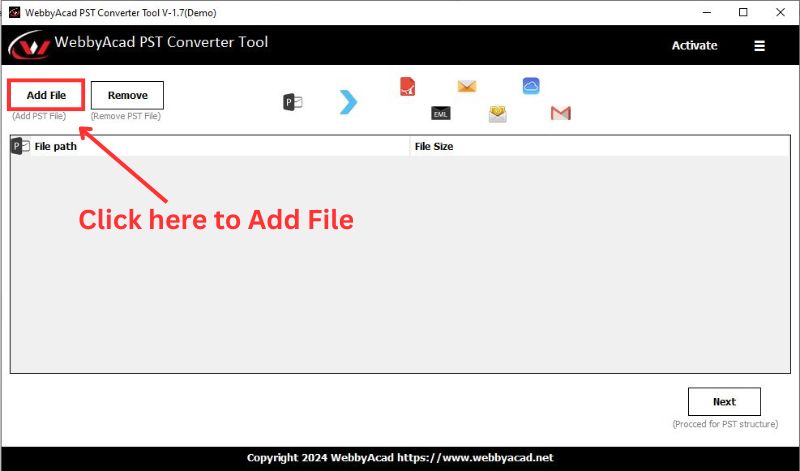
Step 1: Upload: Launch the WebbyAcad PST Converter. Click on “Add File” to browse and select your Outlook PST data
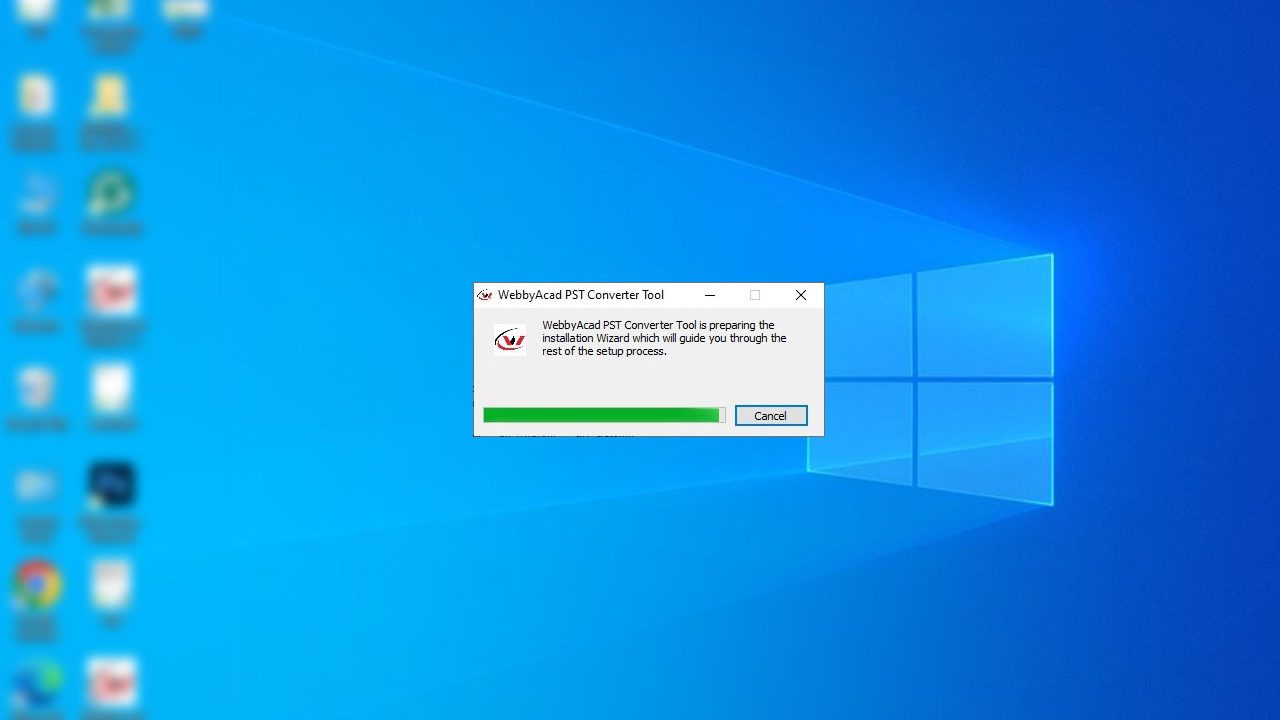
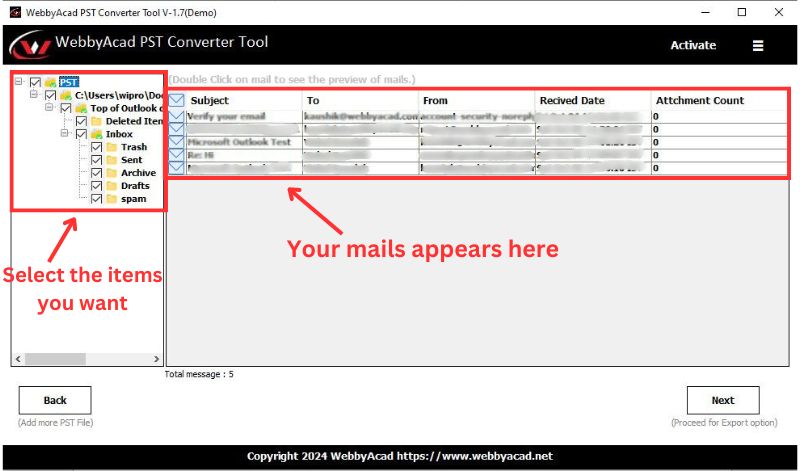
Step 3: Preview all the emails. For a detailed preview, double-click the email to read the entire mail. In case of selected email migration, click the emails by holding the CTRL key and click export.
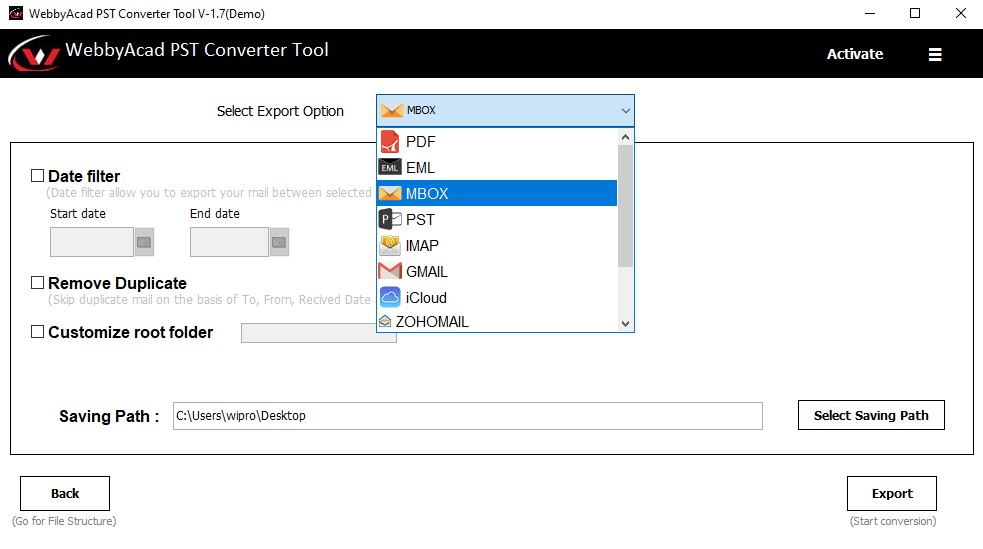
Step 4: Select MBOX from the Export drop list. You can also filter out emails on the basis of date. Set the location where you want to save the MBOX file.
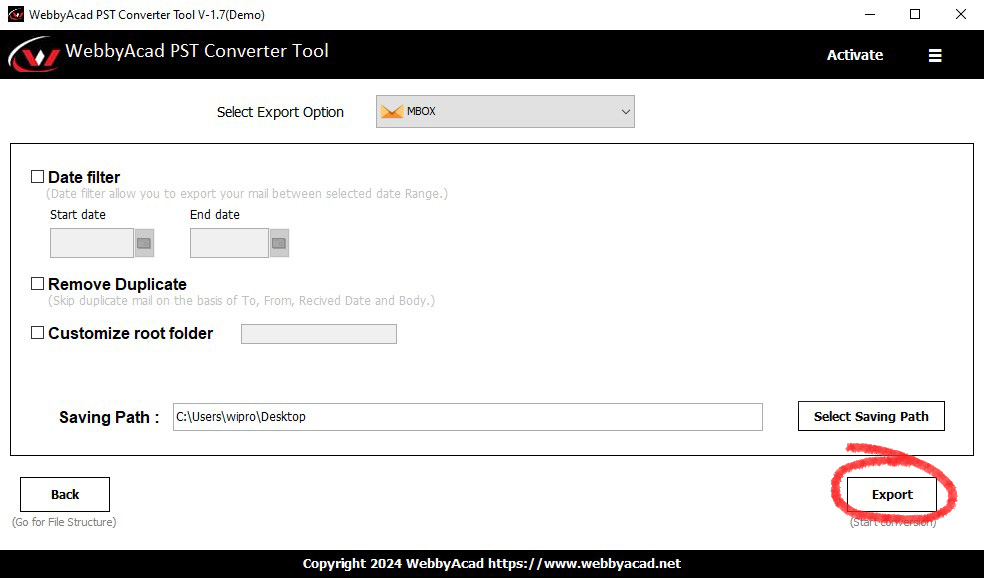
Step 5: Click “Export” option to start the export process. Depending on the file size, the process is expected to take some time. A message of completion will show up after a successful conversion.
The Result: A healthy, standard MBOX file ready to be imported into Thunderbird, Apple Mail, or any other MBOX-supported client.
Method 2: The Manual Thunderbird “Drag and Drop” (Free)
If you only have a handful of emails (less than 1GB) and plenty of time, you can try the manual route. This requires both Outlook and Thunderbird to be installed on the same machine.
- Install the ImportExportTools NG add-on in Thunderbird to set it up.
- IMAP Sync: Set up an IMAP account that both Outlook and Thunderbird can use, like Gmail.
- The Move: To move your folders from the PST section in Outlook to the IMAP account, drag them over. Wait for it to sync with the cloud.
- The Retrieval: Open Thunderbird and let the emails from the IMAP account download.
To export, right-click the folder in Thunderbird, then choose ImportExportTools NG > Export Folder
Critical Comparison: Manual vs. WebbyAcad
| Feature | Manual IMAP Sync | WebbyAcad Software |
| Speed | 2-5 Hours (Dependent on Net) | 2-5 Minutes (Direct) |
| Outlook Required? | Yes | No |
| Success Rate | ~60% (Risk of Sync Errors) | 100% (Bit-for-Bit Accuracy) |
| Attachments | Often stripped or corrupted | Fully Preserved |
| Technical Effort | High (Complex Setup) | Low (Single Dashboard) |
At last, we have witnessed enough and have enough knowledge to say why PST email software made PST-to-MBOX conversion easy. It is not a herculean task anymore to perform conversions. With options such as the best converter for PST emails tool, users can have enjoyable, fast, and accurate conversions. When changing one email client to another or storing data, or when looking for missed emails, these tools make it possible to do so seamlessly. Therefore, cut out the complex manual approaches and proceed with the simplicity of modern PST email software converters and get to the world of ease.
Final Verdict: Which Method Should You Choose?
If you are a student moving a few personal emails, the manual Thunderbird method might suffice. However, if you are a professional, an IT admin, or a business owner, the risk of losing important client communications or legal attachments is too high.
WebbyAcad PST to MBOX Converter provides a secure, offline environment where your data never leaves your machine. It is the gold standard for data migration in 2026, offering speed, security, and simplicity in one package.